Logging into your Jalwa Game account is the gateway to accessing all features, including games, wallet services, bonuses, and account settings.
Whether you are a new user who just registered or an existing player returning to continue your gameplay, understanding the correct login process is important for a smooth experience.
How To Login On Jalwa Game?
Jalwa Game is designed with a simple and user-friendly system, so users can access their accounts quickly without technical confusion.
In this complete guide, we will explain how to log in to Jalwa Game step by step, what to do if you face issues, and how to keep your account secure after logging in.
Before You Start
Before attempting to log in, make sure you have:
- Your registered mobile number
- Your correct account password
- A stable internet connection
- Access to the official Jalwa Game website or app
Always use the official platform to avoid security risks. If you haven’t created an account yet, first read our step-by-step guide on how to register on Jalwa Game.
Step-by-Step Guide to Logging in on Jalwa Game
Follow the steps below to access your account:
Step 1: Open the Official Platform
You can log in through either:
- The Jalwa Game mobile app, or
- The official website on your browser
Open the platform on your device.
If you haven’t installed the app yet, read our detailed tutorial on How to Download and Install Jalwa Game App Safely on Your Device.
Step 2: Click on the Login Button
On the homepage, you will see the account tab in the bottom menu. Click on it, and you’ll be redirected to the login page.
For direct access to the login page, you can click on the Login button below.
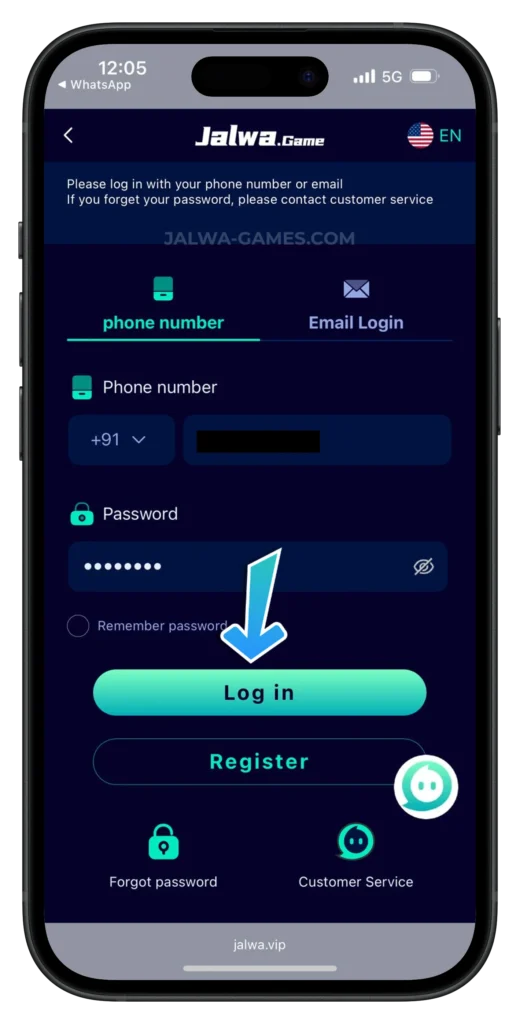
Step 3: Enter Your Registered Mobile Number
In the first field, enter the mobile number that you used during registration.
Make sure:
- The number is entered correctly
- There are no extra digits
- You are using the same number linked to your account
Entering the wrong number will prevent you from accessing your account.
Step 4: Enter Your Password
In the next field, type your account password carefully.
Ensure that:
- You use the correct spelling
- You check for uppercase or lowercase letters if applicable
- There are no extra spaces
If your password is incorrect, the system may show a login error.
Step 5: Click on Login
After entering your details, click on the Login button.
If your information is correct, you will be redirected to your personal dashboard instantly.
What Happens After Login?
Once logged in, you can access:
- Your wallet balance
- Deposit and withdrawal options
- Available game categories
- Activity bonuses
- Referral section
- Account settings
Your dashboard gives you full control over your gaming activity and financial transactions.
Before requesting payouts, we recommend reviewing our guide on How To Withdraw From Jalwa Game to understand limits and processing steps.
You can also learn how to deposit money in Jalwa Game.
Common Login Problems and Solutions
Sometimes users may encounter minor issues when logging in. Here are common problems and how to solve them:
1. Incorrect Password
If you see a password error:
- Recheck the password
- Make sure Caps Lock is not turned on
- Try entering it again carefully
If you still cannot log in, use the password recovery option or contact Jalwa Game customer support.
2. Forgotten Password
If you forget your password:
- Look for the “Forgot Password” option on the login page
- Follow the instructions to reset your password
If there is no automatic reset option, contact customer service through the support section.
3. Wrong Mobile Number
If you accidentally enter a different number, the system will not find your account. Always use the exact mobile number used during registration.
4. Website Not Loading
If the website or app is not loading:
- Check your internet connection
- Refresh the page
- Clear browser cache (if needed)
- Restart the app
Most loading issues are temporary and can be fixed easily.
Important Security Tips After Login
Keeping your account secure is very important. Follow these safety tips:
- Never share your password with anyone
- Do not share OTPs or verification codes
- Log out when using a shared device
- Avoid clicking unknown links claiming to be Jalwa Game
- Regularly check your wallet history
- If you want a deeper analysis of platform security, read our detailed article Is Jalwa Game Safe? where we review risk factors and protection measures.
Maintaining privacy ensures your funds and account remain safe. You can also go through online account safety guidelines.
Logging In on Different Devices
Jalwa Game allows access from:
- Android mobile devices (via app)
- Any Mobile browsers (iPhone also)
- Desktop or laptop browsers
No matter which device you use, the login process remains almost the same.
However, for better performance and smoother navigation, many users prefer using the dedicated mobile app.
When To Contact Customer Support
You should contact customer support if:
- Your account is locked
- You see repeated login errors
- Your registered number is no longer active
- You suspect unusual activity
Support can be accessed from the account section or customer service option once logged in (or through available support channels).
To improve your overall experience, don’t miss our insights in Jalwa Game Tips From An Expert.
Conclusion
Logging into Jalwa Game is quick and straightforward, taking only a few seconds with the correct details.
By entering your registered mobile number and password, you can instantly access your account and enjoy the platform’s features.
Always use the official website or app, double-check your login information, and keep your account credentials secure.
If you face any issues, simple troubleshooting steps or customer support can help resolve them.
You can also explore our in-depth review, “Why Is Jalwa Game The Best Online Gaming Platform,” to understand its key features and benefits.
With the right login steps and safety practices, you can enjoy a smooth and secure experience on Jalwa Game anytime.